Custom view controller transitions with UIDynamic behaviors
When I watched the WWDC videos from 2013 I was most exited about SpriteKit, UIDynamics and custom view controller transitions. The last two days I finally found time to look into two of those in a bit more detail.
I was curios whether a custom view controller transition in combination with `UIDynamic` behaviors would have a good enough performance on my old iPhone 4. So I tried it.
If you are like me, you have been confused by the WWDC session about custom view controller transitions. After watching the video I had no idea where to start. Fortunately there are a few blog posts about it ([here](http://www.objc.io/issue-5/view-controller-transitions.html) and [here](http://www.teehanlax.com/blog/custom-uiviewcontroller-transitions/) for example).
In fact it's quite easy to add custom view controller transitions to an App. In case of a `UINavigationController` we just have to provide a delegate for the navigation controller and overwrite the method
- (id<UIViewControllerAnimatedTransitioning>)navigationController:(UINavigationController *)navigationController
                                  animationControllerForOperation:(UINavigationControllerOperation)operation
                                               fromViewController:(UIViewController *)fromVC
                                                 toViewController:(UIViewController *)toVC;
The object which is returned by this method has to implement two protocol methods.
- (NSTimeInterval)transitionDuration:(id<UIViewControllerContextTransitioning>)transitionContext;
- (void)animateTransition:(id UIViewControllerContextTransitioning)transitionContext;
As an example we will build a dynamic view controller transition with a snap behavior.
The problem with the dynamics of UI elements is that we have no control about the timing. It's done when it's done. Because of that we have to test how long the animation needs to be to look good. Let's start with a duration which is obviously to long.
- (NSTimeInterval)transitionDuration:(id<UIViewControllerContextTransitioning>)transitionContext {
    return 5.0f;
}
To add the animation we have to animate the appearance and/or disappearance of the views of the two involved view controllers. In the case of the snap behavior we will put the view of the view controller which will be pushed onto the navigation stack on the right side just outside of the screen and add a snap behavior.
- (void)animateTransition:(id<UIViewControllerContextTransitioning>)transitionContext {
    // Get the view controllers for the transition
    UIViewController *fromViewController = [transitionContext viewControllerForKey:UITransitionContextFromViewControllerKey];
    UIViewController *toViewController = [transitionContext viewControllerForKey:UITransitionContextToViewControllerKey];

    // Prepare the view of the toViewController
    toViewController.view.frame = CGRectOffset(fromViewController.view.frame, 0.6f*fromViewController.view.frame.size.width, 0);

    // Add the view of the toViewController to the containerView
    [[transitionContext containerView] addSubview:toViewController.view];

    // Create animator
    UIDynamicAnimator *animator = [[UIDynamicAnimator alloc] initWithReferenceView:[transitionContext containerView]];

    // Add behaviors
    UISnapBehavior* snapBehavior = [[UISnapBehavior alloc] initWithItem:toViewController.view snapToPoint:fromViewController.view.center];
    [animator addBehavior:snapBehavior];

    dispatch_after(dispatch_time(DISPATCH_TIME_NOW, (int64_t)([self transitionDuration:transitionContext] * NSEC_PER_SEC)), dispatch_get_main_queue(), ^{
        animator = nil;
        [transitionContext completeTransition:![transitionContext transitionWasCancelled]];
    });
}
Done. If we connect the navigation controller delegate with our animator class the push will use the dynamic animation to push the view of the next view controller onto the navigation stack. The corresponding method of the navigation controller delegate then looks like this:
#import "DDHSnapPushAnimator.h"

...

- (id<UIViewControllerAnimatedTransitioning>)navigationController:(UINavigationController *)navigationController animationControllerForOperation:(UINavigationControllerOperation)operation fromViewController:(UIViewController *)fromVC toViewController:(UIViewController *)toVC {
    if (operation == UINavigationControllerOperationPush) {
        return [[DDHSnapPushAnimator alloc] init];
    }
}
Now we have to finalize the animation duration. After a bit trial and error 0.8 seconds seam to be enough for the dynamic animation to look good.
- (NSTimeInterval)transitionDuration:(id<UIViewControllerContextTransitioning>)transitionContext {
    return 0.8f;
}
The result looks like this
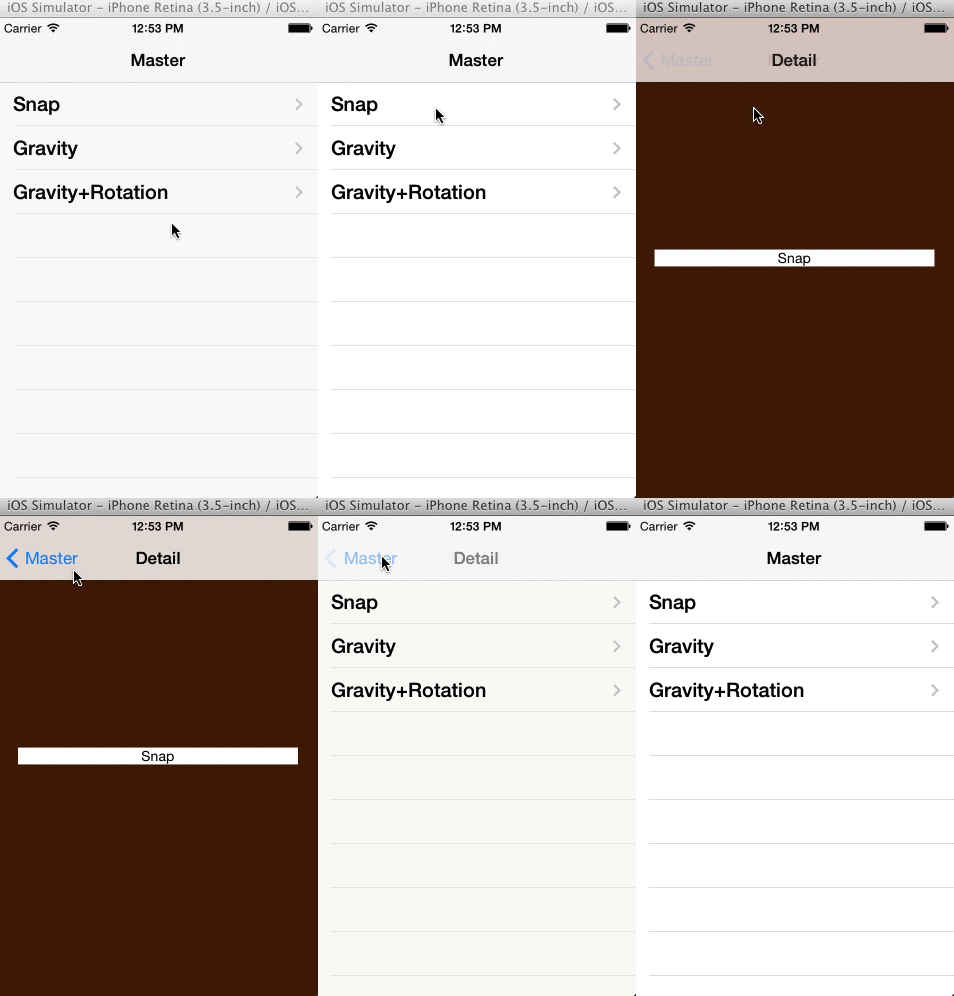
This code and the code of two other dynamic view controller transitions can be found on [github](https://github.com/dasdom/DDHDynamicViewControllerTransitions).
As always, I you have any comments or an idea how to handle the timing in a better way, connect me on App.net: [@dasdom](https://alpha.app.net/dasdom).